
How to Password Protect an Individual Web Page or Entire Website in WordPress

Nov 1, 2018

There are several reasons you might want to password protect a web page or even an entire website…

  • to restrict access to a client specific product, such as photographs or artwork
  • provide information to employees only
  • protect others personal information, like in the case of membership directories or medical records
  • restrict information about events or products for paid members
  • gather feedback about a page or website in progress without making it live

To password protect an individual page in WordPress, you can actually use a functionality built into WordPress by following these steps…

  • Click on “Pages” in the left hand dashboard in the WordPress admin area
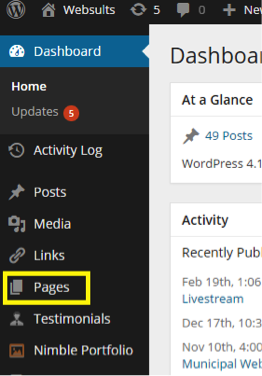
  • Choose the page you want by clicking on the title of the page
  • Click “Edit” next to “Visibility” in the upper right corner
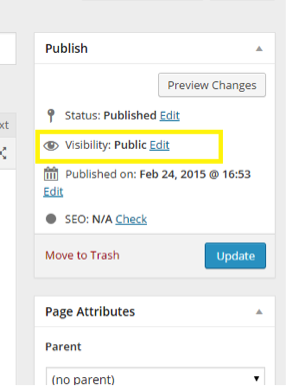
  • Select “Password protected”, Enter A Password, And Click “OK”
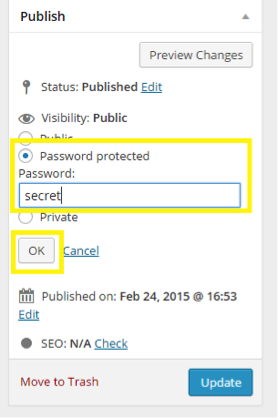
  • Click “Update”
  • Try accessing the page. You should be prompted to enter a password.

This type of password protection for the page is generalized. Everyone you choose to access the page will be provided with the same password. This can be a good option for narrowing the audience of material. One drawback might be that the password can be distributed.


If you wanted to secure a page in a more individualized manner, you can install the “Simple Membership” WordPress plugin. This will allow members to have individualized logins to the page. The plugin can be configured to allow paid and/or free membership access.

To password protect an entire site, you can install the “Password Protected” WordPress plugin.

Either plugin can be installed by…

  • Hovering over “Plugins” in the left hand dashboard in the WordPress admin area and clicking on “Add New”
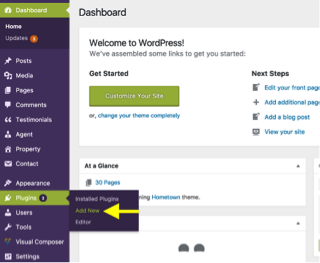
  • Search for the plugin you want

  • Once you locate your desired plugin, click “Install now”
  • Once installed, click “Activate”


For the “Password Protect plugin, you must enable “Password Protected status” by…

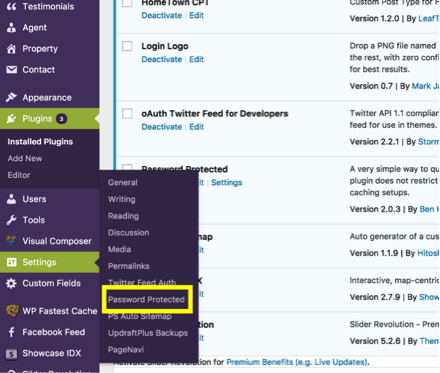
  • Going to “Settings” in the left hand dashboard in the WordPress admin area and clicking “Password Protected”
  • In the “Password Protected Settings”, click “Enabled” next to “Password Protect status”
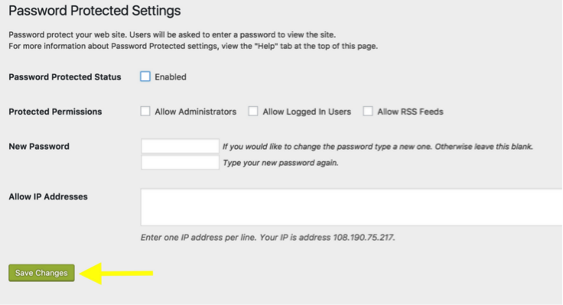
 

  • Then click “Save Changes”


Websults w logo
Not Ranking? Let’s Fix What Google Sees.
Fill out my online form.

Search
Blog Categories
Follow Us
Reviews
  • The whole team at Websults are amazing! They did a great job with our website, very professional and extremely helpful. What I thought was going to be a long process couldn't have been more efficient and our old , out dated website was up and running within weeks! Always accessible - Jonathan and team could always be reached - and continue to be available even after the project has been completed. I'd highly recommend Websults for any website work!

    Axion Office Avatar Axion Office
    February 9, 2026
  • Excellent work in creating our website! Competent, professional, creative, responsive, timely and reasonably priced.

    Marc Ayers Avatar Marc Ayers
    July 1, 2025
  • Websults has always been very helpful with any of our site needs!

    Marketing JTCC Avatar Marketing JTCC
    May 1, 2025
Jonathan Weindruch
This article was reviewed and edited by Jonathan Weindruch.

About the Editor

Jonathan Weindruch
Websults LLC was founded by Jonathan Weindruch, Vanderbilt MBA. Jonathan is a web strategy consultant with expertise in e-business, digital marketing, and web site development projects. Jonathan, a Fulbright scholarship winner, graduated magna cum laude from Vanderbilt. Over the last 20 years, he has managed the design and development of hundreds of websites for businesses, government agencies, and non-profits.

Client Reviews

Websults IconWebsults

13555 Automobile Blvd Suite 370, Clearwater

4.8 54 reviews

  • Avatar Axion Office ★★★★★ a month ago
    The whole team at Websults are amazing! They did a great job with our website, very professional and extremely helpful. What I thought was going to be a long process couldn't have been more efficient and our old , out dated website was up and running within weeks! Always accessible - Jonathan and team could always be reached - and continue to be available even after the project has been completed. I'd highly recommend Websults for any website work!
  • Avatar Marc Ayers ★★★★★ 9 months ago
    Excellent work in creating our website! Competent, professional, creative, responsive, timely and reasonably priced.
  • Avatar Marketing JTCC ★★★★★ 11 months ago
    Websults has always been very helpful with any of our site needs!
  • Avatar Blue Print ★★★★★ a year ago
    Websults did a great job working with us to design a better website. Recommend them highly! - Midstate Graphics
  • Avatar Doug Eadie ★★★★★ a year ago
    Jon and his crew at Websults did a great job of designing my company's new web site five years ago and more recently creating a master archive for posts at my three professional blogs. Their service as my company's webmaster has been superb - always responsive and thorough.
  • Avatar Michael Faust ★★★★★ a year ago
    I have been totally satisfied with my new website and the service I have received from Jonathan and his crew at Websults. The website looks amazing and Jonathan collaborated with me to make sure my website was everything I wanted. I would highly recommend his company if you are looking to get a new website!

Websults w logo

Let's Work Together

Use the form to the right to request a price estimate for your next web design, development, or digital marketing project. We normally reply back to online inquiries within 24 hours. Most prospective clients find that our pricing is less expensive than they expected.

Fill out my online form.

Skip to content